
Home›Features
Everything Frankie does, in one place
You drive Frankie by talking, which is why the list of what he can do keeps growing while the app stays simple. Here is everything in it today, from the phone call that starts it all to the newest arrival: Frankie for Google Chrome.
The three that matter most
What almost nothing else gives you
Plenty of assistants talk. These are the parts people notice are missing everywhere else once they have had them.
A memory that does not reset
Frankie keeps what you tell him and uses it next time. You never re-explain who your cardiologist is, which supplier let you down, or what you agreed last month.
Everything he knows is in Memory, where you can read it and take off anything you would rather he forgot. Privacy Mode keeps the personal things to himself whenever other people are around.
You sayWhat did I decide about the roofing quote?The people in your life, saved
Names, numbers, email addresses, street addresses, and how each person relates to you. Frankie writes to them, calls them, and puts their address on a map.
He never guesses. “Call my daughter” means one specific person with one specific number, which is the difference between an assistant and a search box.
You sayEmail Dr Reyes and ask to move Thursday.A real conversation, in your language
Press Call Frankie and talk the way you would on the phone. He lets you finish, waits while you think, holds the line when the doorbell rings, and hangs up when you say goodbye.
He speaks sixteen languages and follows you when you switch, message by message, so you can always talk in whichever language comes naturally right now.
You sayAhora en español, por favor.NewFrankieGPT for Chrome
Now he sits beside every website
Add Frankie to Google Chrome and he opens in the side of your browser, with the same account, memory and conversation as your phone.
- He reads the page with you and explains it in plain words.
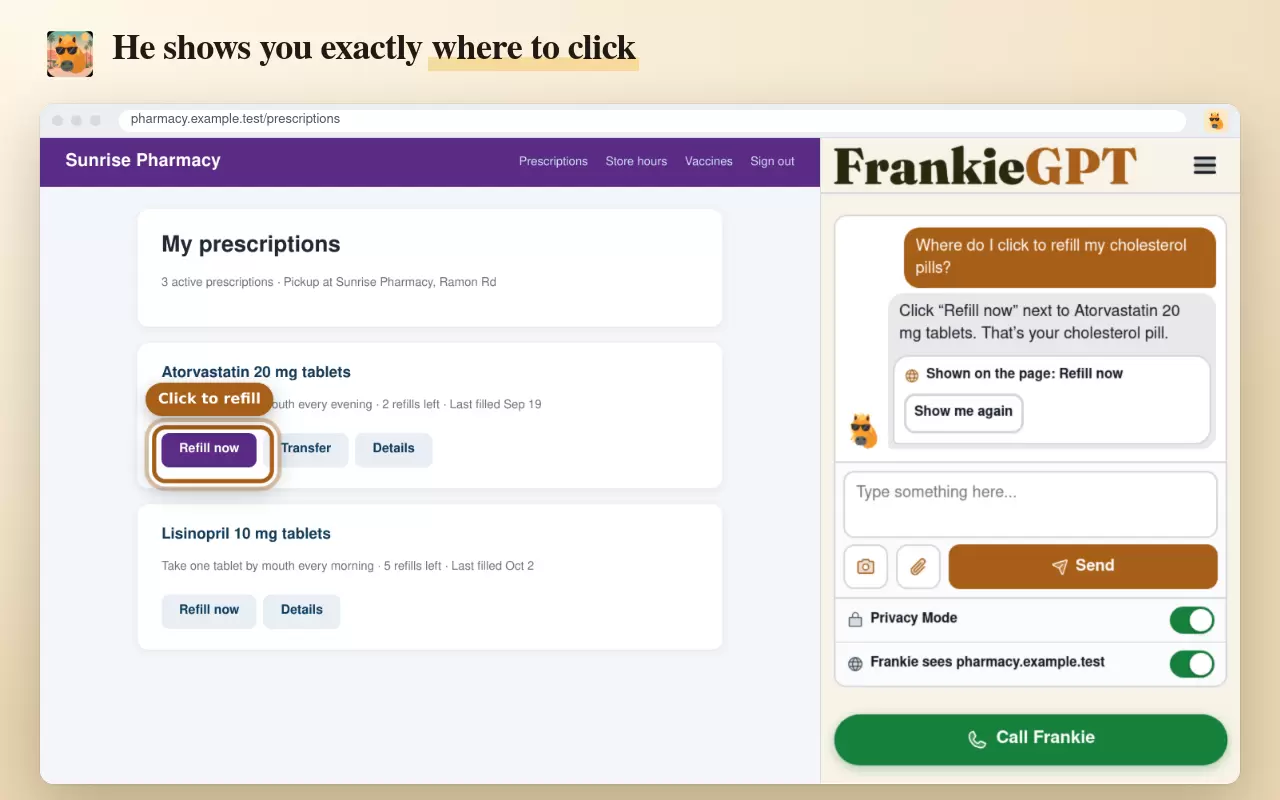
- He shows you where to click with a ring around the right button.
- He fills in forms after you check every word and press OK.
- He warns you about scams before anyone gets a penny.

Free to add on Windows, Mac, Chromebook and Linux. See Frankie in Chrome
The full list
Everything, theme by theme
Every one of these works by asking. Say what you want in your own words and Frankie does the rest.
Talking with Frankie
- Call FrankieOne tap and you are talking, like a phone call with a friend who has all the time in the world. He says hello in your language.
- He lets you finishFrankie waits through your pauses, keeps up when you interrupt, and lets you change your mind halfway through a sentence.
- Hold, and goodbyePut the call on hold when the doorbell rings. Say goodbye and he hangs up for you.
- Talk or type, any timeType during a call and he answers in writing and out loud. It is all one conversation.
Memory and privacy
- A memory that lastsFrankie remembers what you tell him and uses it next time. See everything he knows in Memory, and take off anything you want him to forget.
- Privacy Mode, on from day oneHealth, money and family matters stay private when other people are around. One switch brings his memory back.
- Pick up where you left offOpen any past conversation and carry straight on.
- Voice lock, if you want itTeach Frankie your voice and he answers only to you, not to the television or a visitor.
People and messages
- Your people, savedNames, numbers, addresses, and how each person relates to you, so “call my son” is never a guess.
- Messages written for youFrankie writes the text or the email and it opens in your own Messages or Mail, ready for you to press send.
- Sent straight to youAnything he makes, pictures included, can come to your own phone or inbox. He tells you when it has gone.
- Frankie in your address bookSave his number and email to your phone in one step, so his calls and messages always show his name.
Reminders and calendar
- Reminders that ring youFrankie phones you in his own voice, on your cell, your home line, or both. Press 1 to hear it again. Voicemail gets a proper message.
- Or by text and emailChoose how each reminder reaches you, once or on repeat, always at your local time.
- A calendar that notices clashesAppointments, reminders and day notes in one place. Double book and he offers the next free time.
- Nothing disappears on its ownOnly you remove things from your calendar. Frankie never tidies away what you saved.
Documents and pictures
- Reads anything you photographLetters, bills, forms, prescription labels and PDFs, explained in plain words with the important parts kept exact.
- Translated and checkedAsk for any page in another language, and he points out the signs of a scam before you act on it.
- Pictures on requestFrankie draws a picture or a labeled diagram when that is the clearest way to explain something.
- Keep it, send itSave, share, text or email anything he makes, straight from the conversation.
Notebook and Files Drive
- A Notebook he writes inNotes, tables and shopping lists you tick off in the store. Phone numbers, addresses and links are all tappable.
- Pages full of what he foundProducts with prices and Buy buttons, nearby stores with directions, pictures and flights, kept on one page.
- A gigabyte of Files DriveFolders, fast previews and share links, with an optional six digit code, that you can stop at any moment.
- Web pages, made for youAsk for a page about anything, from a family reunion to a garage sale, and get a link you can share.
Search, shopping and travel
- He looks it up firstAnswers come with the links, pictures, news and videos right in the conversation, and your searches are kept for later.
- Shopping, done properlyA good pick online with the shop’s own page, plus the nearest store that has it, in one answer.
- Restaurants and things to doPlaces a local friend would choose, good for kids or brand new, with Call, Directions and Website buttons.
- Real flights, and trafficTimes, stops and fares, each ready to book, plus live traffic and how long it takes to get there from home.
Your town and For You
- Local news, every dayWeather, alerts and headlines from your own town’s papers, already in mind when you start talking.
- What is going on near me?Sirens, police, fire trucks, a helicopter overhead, or something fun this weekend, explained plainly.
- Your For You feedSeven days of weather, your town, and the places and subjects you follow, newest first.
- Follow any channelYouTube, Instagram, TikTok, Facebook, X, LinkedIn, Bluesky and more, with no account of your own. Videos play right in the feed.
In Google ChromeNew
- He reads the page with youAsk about the bill, letter or article on your screen and get an answer about that very page.
- He shows you where to clickA glowing ring around the right button, scrolled into view, with Show me again if you missed it.
- Forms filled, with your OKYou see every word he will type before anything happens, and he never touches a button that pays.
- Scam warnings, bigger words, lost tabsFake alerts and look-alike sites get a calm warning. Small text gets bigger. Lost tabs come back. Right click anything to ask about it.
Sixteen languages
- Your language, everywhereEnglish, Spanish, Russian, Ukrainian, Chinese, Tagalog, Vietnamese, Korean, French, German, Polish, Italian, Portuguese, Hungarian, Armenian and Arabic.
- He follows youSwitch languages mid-conversation and Frankie switches with you, then back again.
- An interpreter on requestAsk him to interpret and he carries a conversation between two people, both ways.
- Your name, said rightFrankie says your name the way you say it, and uses the pronouns you choose.
Everywhere you are
- Apps for iPhone and AndroidFree in the App Store and on Google Play. Frankie is one tap away on the phone that is always with you.
- Any browser, any screenPhone, tablet or computer. On a wide screen you get the conversation and your screens side by side.
- One conversation everywhereStart on the phone, carry on at the computer, and go back again. Nothing is lost between them.
- Sign in with your phoneOn a computer, point your phone camera at the square and press Yes. No password to type.
Made for every hand and eye
- Accessibility built inProfiles for low vision, dyslexia, limited movement, screen readers, seizure safety, and focus.
- Words beside every iconNothing depends on color alone, and the whole menu fits on one screen.
- Just ask to go somewhereSay “open my calendar” and it opens. Frankie runs every screen from the conversation.
- The chat waits for youScroll up to read and the conversation stays put until you are ready.
The rules
Designed for trust, not tricks
These are written into the product rather than into the fine print.
Messages to other people open in your own Messages or Mail app, and you press send. Frankie’s own phone number and email reach only you.
Health, money and family matters stay private when friends are in the room. You decide when Frankie brings his memory back.
Frankie never diagnoses, never changes prescription instructions, and points to a pharmacist, doctor, or professional when it matters. In an emergency he says to call 911.
Frankie can tidy your calendar, notes and files, but anything that deletes or shares asks for your tap first.
No advertising, no data brokers, no profile building, and no cross context behavioral advertising. The privacy notice says so in detail and in plain words.
Conversations, mail, reminders, saved people, files and voice prints. Delete the whole account from Settings, and it goes properly.
Questions
About the product
Is this just a chatbot with a voice on top?
Does Frankie do things, or just tell me how?
What is Privacy Mode?
Which languages does Frankie speak?
Can Frankie send things without me?
What does it run on?

Put a capable assistant in someone’s hand today
Create an account, add the people who matter, and start talking. Free apps for iPhone and Android, Frankie for Google Chrome on the computer, and any browser on any phone, tablet, or computer.
Start free

Free on iPhone, Android and Google Chrome
Free to start, and no card is asked for. Set Frankie up the way you want him and get to know him properly.